Showing posts with label wifi. Show all posts

Product Review – Solwise WiFi Directional Antennae

As mentioned in my blog post back in June, this summer we’ve had the opportunity to evaluate two more products from the good folk at Solwise, namely outdoor antennae to extend and and enhance WiFi reception when on site. Those who follow our exploits on Facebook and Twitter will have already seen who we got on but I’d like to go into a little more detail about how they work in practice.

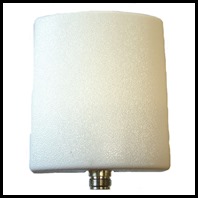
First up is the Outdoor Panel Antenna. This will be of most interest to those that alreadynet-wl-ant010pn-1 have the Patriot/3000 WiFi kit that I reviewed back in April. This directional antenna simply screws into place instead of the supplied omnidirectional antenna using the ‘N’ connector on the bottom. It has a gain of 10dBi as opposed to 5dBi. To get the best signal and the curved front needs to be facing the source, so a look around the site may be of help here. Alternatively point it towards a property where there may be another source of WiFi, perhaps a nearby pub, farmhouse or office perhaps. Once it’s aimed in roughly the right direction you will need to adjust it to get the best signal and this is where a pad/tablet pc or large screen phone is handy. You’ll see why below.

Log into the router software in the usual way and click on Change Profile. Those who already have used the kit with the standard antenna will be familiar with these steps.

Then click on Site Survey – this will bring up a list of all available access points. Look for the one you are wanting to connect to and note the figures in the Signal column,then adjust the antenna slightly one way or another, by holding the knurled ring and rotating the antenna, re-tightening afterwards.

Click on Site Survey again. You are looking to increase the score out of 100 (**/100) for the signal quality and lower the figure for strength (-**dBm) If you see an improvement in the figures then you’re heading in the right direction. I’ve found that you can usually achieve the best available signal in three or four goes. Once you are happy Select and Save as required. Log in to the service provider in the usual way you would with the standard aerial.

20170725_084112Ok, so it’s not as straightforward as using the omnidirectional antenna but is it worth the extra effort and cost? Well, having tried it extensively over the summer I would undoubtedly say yes. Two of the sites we stayed on had no dedicated site WiFi yet with this we were able IMG_20170714_121544to pick up BT WiFi from the farmhouse/office and as BT customers – for our sins – that was ‘free’. The only alternative would have been costly mobile data – and the amount we get through thanks to our social media presence – that would have been very costly indeed. At a little over twenty quid as caravanning accessories go it’s not a lot of money and a very sensible addition if you already have the Patriot/3000 Router Kit. Be mindful that it’s more susceptible to strong winds so ensure mountings are secure. It’s worth pointing out though that if you are already picking up a strong signal on the omnidirectional antenna – using this is unlikely to speed up your connection.  For weak signals though, it will make the difference between being online and off. For for details and to buy direct from Solwise click HERE.


The second product we looked at was the Outdoor USB Panel AntennaDB-86WUUMAAAnSB

This is different to the above product in that it is a complete unit connecting directly to a 20170727_200230 (2)computer or router via the attached 5 meter USB cable. If connecting to a computer drivers will need to be installed from the enclosed CD. If pairing with the router that is included with the Patriot/3000 Kit no driver installation is necessary.

The unit comes with a couple of stout jubilee clips but you will need something to attach it to. We used the Vision Plus Multi Mast which provides a couple of fixing options to your ‘van. The jubilee clips were a little large so I used a couple of thick cable ties to attach the unit to the mast.

Aligning to get the best possible signal is the same as above. However, using the Vision Plus Multi-Mast as we did you don’t need to stretch to reach the unit itself. It can be aligned by undoing the retaining nut at the bottom of the mast and rotating as required to achieve the optimum signal.

20170727_200215Again, it got us online when the omnidirectional aerial couldn't and with a gain of 12dBi it’s slightly more powerful than the one reviewed above and on one on site it improved the stability of a very weak WiFi signal further. At a little over forty pounds it is just under double the cost and there is no fixing kit – the Multi-Mast we used is available for around twenty pounds from Vision Plus.

So, is it worth it? Well, if you already have the Solwise Patriot/3000 router kit then perhaps the first antenna will be a better purchase. However, the router in that kit is available separately, so if you haven't bought the kit, you may want to consider pairing this with the router – don’t forget you will need something to mount it on though.

So, another couple of great products from Solwise. Yes, I was given them to review but I wouldn’t recommend them if I didn’t think they were worth it. These, together with our original Solwise kit have kept us online all summer and I’m sure will continue to do so.



Solwise - More WiFi options.

Many of you have read my review of the Solwise WiFi Booster Kit back in April. In fact given Trev the  Portly Partners’ enthusiastic activity on social media I would be surprised if you missed it! It’s been one of most popular reviews and a most useful bit of kit too. I wish I’d bought one ages ago instead of waiting for the opportunity to review one. It’s already saved us plenty in WiFi costs and I expect that will continue throughout the summer.

Talking of the summer I am excited to have the chance to evaluate two more products from Solwise, both of which are designed to pick up even weaker signals than even the impressive kit we reviewed. They do the same thing but what they can do it with differs, so lets take a look.

First up is the Outdoor USB Panel Antenna

DB-86WUUMAAAnSBThis connects to your computer or suitable router via USB like the Patriot that was in the kit we reviewed. A driver and utility disk is included but this won’t be needed if it’s paired directly with the Solwise router. Two jubilee clips are included for mounting on a suitable mast but I’m thinking that stout cable ties might be as effective. I have already bought his Vision Plus mast to give more height to our existing kit and the antenna should fix to that just fine.

This is a directional antenna so to perform to it’s potential it needs to be aligned correctly. Rotating the unit on the mast with semi-tight cable ties may be the way to go and I’m looking at ways to make alignment easier and avoid the sort of faffing associated  trying to align a satellite dish manually for example. I’m sure many have seen that carry on on site!

I’ve already had a play with this at home and whilst the environment is completely different to it’s intended use the results gave a clear indication of it’s potential once on site. First though I’ll explain my set up at home to put the results in to context.

My router – a BT Hub Version 4 - sits in the lounge of our flat and in the same room Speedtest.net reports speeds of anything up to 72 Mbps download through Wi-Fi. 

My laptop is situated in the ‘office’ also known as the dining room, spare room, Legs Down HQ and caravan paraphernalia storage area! It's two rooms down along the hall from the lounge and there I can expect around 8-12 Mbps download. Nothing like the speeds several walls and a few metres away in the lounge but still something many could only dream of!

With the antenna connected via USB and driver installed results were certainly interesting. Having the antenna laying flat on it’s back on the floor made little difference to download speed. However, positioning the unit upright and directing in roughly towards the BT router speeds improved to 28 Mbps. Up to three times faster than without. Three  minor adjustments to the antennas direction brought speeds progressively up to 32 Mbps – and this was still through several brick walls.

Now, as I said this in no way simulating it’s intended use but it does show two things – it’s potential power in picking up weak signals and the importance of correct alignment to achieve the best results. I’m very much looking forward to trying this out on site and paired with the Solwise router that we already have as part of the kit reviewed in April.

In addition we will also be looking at the Outdoor Panel Antenna.

net-wl-ant010pn-1WP_20170331_13_03_34_ProThis has an N-type connector and a bracket at the rear for wall mounting if you wish. For those of us that already have the kit that I reviewed however, this can directly replace the omnidirectional unit included in that kit – shown here in action.

Again, this device though is directional – so to work correctly and pick up weaker signals it needs to be aligned accurately. And again, I will be looking at ways to make this easier.

We will be having a thorough look at both devices throughout the summer with a written and hopefully video review to follow.

For those of you that have read enough and are already interested, the USB Panel Antenna is available for a little over £40 HERE. If you have the Patriot Wi-Fi Booster Kit then the Outdoor Panel Antenna is an excellent value upgrade at a little over £20 and you can see that HERE.

My review of the Patriot Wi-Fi Booster Kit can be found HERE and the accompanying video HERE